
Set the parameters and follow the rules!

Increase the productivity of your CAD!
Reduce the resources used to produce the drawing!
It increases security and prevents errors

It allows to Export bar list to Excel format
- Details
- Category: Categories GB
- Hits: 8817

A few simple steps:
- Recognition of any geometry
- Division by sub-areas
- Adaptation of the selected bar to the current geometry


- Details
- Written by: Staff Auto_C.A.
- Category: Categories GB
- Hits: 9584
 SETEC Informatica Srls
Tel: +39(0)543 796146
Fax: +39 (0)543 797146
E-mail:
Head office:
Via Copernico,101 – 47122 Forlì (FC) (Italia)
P.IVA/C.F.: 04535350401
to speak in English, call at
+39 335 617 3732
Enrico speaks
Legal information:
Our website has been compiled with great care. Nevertheless, we can not guarantee the accuracy of the information contained herein. Any liability for damages is excluded, unless caused by intent or gross negligence by the publisher of this website. The publisher reserves the right to change the content of the site at any time in its sole discretion and without prior notice. Despite careful control we assume no liability for the content of external links. For the contents of the linked pages are only their operators responsible. All personal information collected, stored and processed on this website are solely for your personal support, the sending of products or the submission of offers. The specified data can be divulged to any other companies, if it is needed for the better support. The publisher assures you that your information will be kept confidential in accordance with applicable data protection laws.
Privacy notice:
SETEC Informatica knows that you care how information about you is used and shared and we appreciate your trust that we will do so carefully nad sensibly. This notice describes our privacy policy. All personal information collected, stored and processed on this site are solely for:
- sending products
- personal support
- gathering anonymous statistics
- sending activation codes
- submission of offers
- invoicing
This data won't be passed to any other company. Excluded from this are our service partners, when the order process requires the transmission of data (eg the distributor responsible for the delivery and the staff responsible for payments). In these cases, the amount of transferred data is limited to the necessary minimum. The publisher assures you that your information will be kept confidental in accordance with applicable data protection laws. Customer has rights to check and change its data and he has rights to stop collecting his personal data.
Information about cookies: Cookies are text information that are saved in your browser. Thanks to them the website can rememebr your preferences and suit them to your needs. In particular we store the following information on this website: is the visitor logged on the website, site preferences about website display, data that is required for statistics, including: time of last visit, if the visitor has already been on this website before, which device is he using, location of IP address etc. You can always disable the acceptance of cookies in your browser, in order to do so you need to check your configuration options and disable the cookies. Keep in mind however than after the operation, the website may not work properly.
- Details
- Category: Categories GB
- Hits: 6193

XML DIALOGUE PROTOCOL
GstarConcrete is an open world: we are available to help any Software house develop its compatibility with our SW environment. Hence, the final user, will be able to export, from the calculation program, to GstarConcrete, graphic elements that will turn into parametric objects, once open with it. As a consequence, thanks to public protocols that dialogue with illustrative guides, everyone may obtain from its calculation drawings, new paramtric proffesional and official drawings. This is an example of the full adaptability of GstarConcrete, being suitable for a wide range of customization projects. We are waiting for your project and customization request!
How it works?
Once completed the process for its full compatibility:
- GstarConcrete can be exported to the calculation programs, generating 3D models.
- GstarConcrete will read also the calculation models and automatically re-draws the decks.
- GstarConcrete automatically re-draws the reinforcements of the calculation programs.
The guides GstarConcrete are freely available in the download section. (you need to register on the site)
- Details
- Category: Categories GB
- Hits: 9032

 1. Select and filter pillars
2. Insert stirrups
3. Longitudinal bars and crops
4. Bars for connection to foundation plate
Also these bars are proposed based on law requirement, NTC. You can insert the bars for connection to the foundation plate (position 16 in the picture).
5. Summary Tables of pillars by decks

- Details
- Category: Categories GB
- Hits: 9270
....
 Main functions
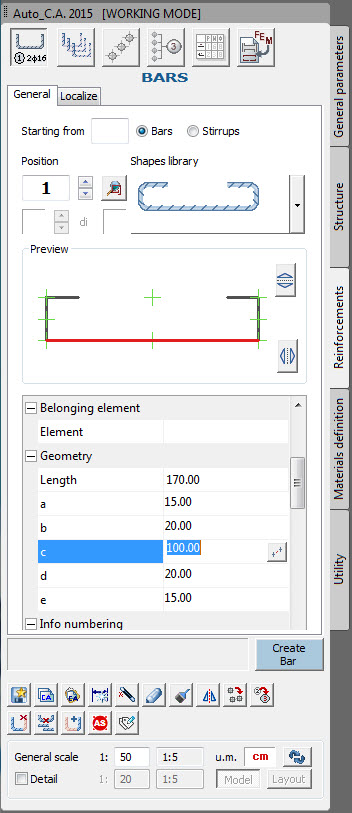
GstarConcrete allows for the drawing of bars for reinforcement with linear, arc, poligonal, shapes. The bars are link to their proper "Dialogue Panel" containing all details, automatic numeration, and real and interactive preview.
Special functions
Modification and management of the reinforcement
- Details
- Category: Categories GB
- Hits: 9830
Specials functions
 Computation
All drawed elements (such as, for example, total amounts and quantities of bricks, pillars, bars, concrete, stirrups...) can get accuratly calculated, and then, exported to Excel, thus producing the required complete quantity surveying.
Automatic sections
By tracing a "cutting line" on structural elements (such as floors, decks, beams or pillars), a section will be automatically generated with dimentions, and names of elements. Besides, by moving on the space the position of that line, both section and the whole drawing will be automatically modified and updated. Finally, also the required level of layout details can be selected and personalized.
Ellipse of stiffness (check of building stifness)
The application, can be useful to estabilish the exact positionning of vertical elements according to external orizontal forces (like wind or seismic effects); it traces the ellipse of stifnesses and calculates the parameters required from Eurocode 8, for the appraisal of the regularity of the building plant.
Text and Symbols with numerator
Functions for the lay-out completion, with necessary symbols, and measures, indicating line sections, automatic texts and numeration, altimetries, dimensionings, fast numeration of the elements.